.png)
.png)

Mobile Computer Services: Why is password manager software important?
The Internet is filled with password-protected applications and websites today. Be it for shopping, booking a cinema ticket, internet banking, or paying bills, most websites/applications require their users to create an account and secure it with a login name and password. Clearly, it becomes cumbersome for the user to remember individual username-password combinations for each of their accounts. As a result, many users tend to repeat the same passwords to access different sites. This practice makes it easy for hackers to hack into their various accounts and create problems. Mobile Computer Services, a managed IT company in Wake Forest, talks about the benefits of using password managers to generate and store passwords.
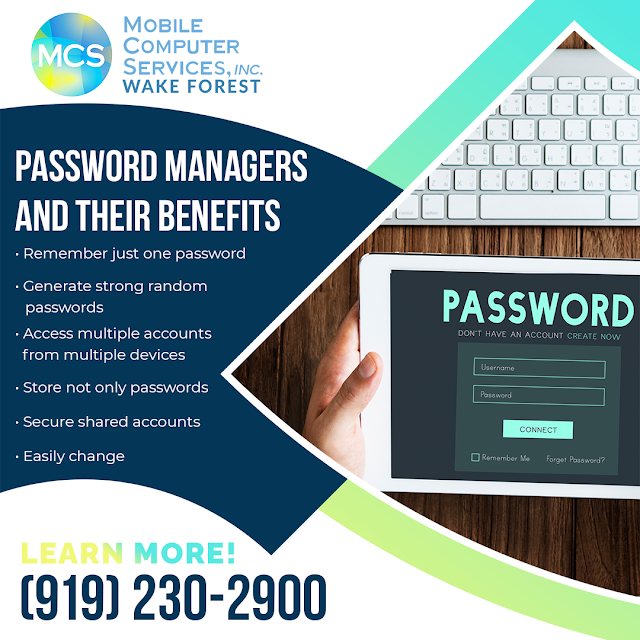
A major benefit of using password managers is that it acts as a digital book that holds all the usernames and passwords of the user. Users have to remember just one master password to log in to their password manager application. Keep in mind that this master password should ideally be a strong and memorable passphrase so that the details are not compromised even in the event of a data breach of the password manager server.
Password managers generate new passwords while creating new accounts on websites/ apps. These passwords will be strong and random and hence difficult to be cracked by a hacker algorithm.
Password managers can be added as browser extensions. Users just have to log in to the password manager, which can autofill the login pages. The passwords are stored securely in the password manager.
Many password managers also allow access from multiple devices. As most people nowadays use their mobile devices to browse the internet, password managers must work across different devices and provide support for mobile app logins.
Password managers are capable of storing data such as memberships, security questions, and profile details like name and phone number.
Sometimes shared accounts are used by a team so multiple people can log in to the same account for certain tasks. Example: a shared social media account of a company. Password managers can be used to control who has access to such shared accounts.
Further, some password managers can allow one person to manage a shared account and control the access without revealing the actual password to other members.
In case of a hack or even otherwise, changing passwords of various accounts is quick and easy with password managers. The password generator can easily generate new strong passwords for the accounts without the user having to remember them all.
Mobile Computer Services is a managed IT services company in Wake Forest, providing the complete package of IT Support, IT Consulting, Server IT Support, Network Services, Internet Security Services, Office Move Assistance, and Hardware as a Service for modern-day companies. MCS has an expert team that acts as your partner in security and guarantees decreased downtime and comprehensive and reliable network security.
Experience the most advanced defense against internet threats by contacting Mobile Computer Services, Inc. at Wake Forest now at (919) 230-2900.
The hybrid work model has gained popularity since the pandemic. In a hybrid work model, employees can work from both onsite and remote locations. Many companies have now adopted the hybrid work model where employees need to work from the office for a few days a week and the rest remotely. This flexible work model can improve the work-life balance for many, thereby increasing productivity and also bringing down business costs. It should be noted that the hybrid model poses challenges, such as the maintenance of IT devices that are spread across multiple locations. Mobile Computer Services, an IT services company in Wake Forest, explains how managed IT can help support the hybrid model better.

Employee isolation is an issue faced by those working remotely. Remote employees may feel isolated when they have a technical IT issue, and there is no IT support at hand. Hence, it is necessary for the IT support team to be robust enough to reach all remotely working employees so that they feel included and their productivity is not affected.
In a hybrid work model, companies must ensure that all devices used by employees are secured with antivirus and anti-malware software. Also, all software updates and patches should be applied on time. It may be difficult for the company to keep track of all devices spread across different locations. A managed IT services company can help streamline such processes.
It may prove challenging for an in-house team to track all the different devices being used by remote employees and ensure that they are in good working condition. Sometimes, employees may even use their personal laptops for work. Hence, it is necessary to ascertain that these devices adhere to company policies and that they are all patched and regularly maintained so that productivity is not impacted. A managed IT company can help to eliminate these problems without the expense of hiring in-house IT staff.
In the case of a hybrid working model, it is essential to back up all data regularly, as employees are mostly on the move and not restricted to one work location. Further, a backup testing strategy should also be put in place to test the efficacy of the backups taken.
When remote employees handle a company’s sensitive data, IT support should ensure that security measures are in place so that the data is not compromised. Cybersecurity training and locked-down company devices can be given to such employees.
Clearly, the hybrid model requires IT support that provides 24/7 proactive management and monitoring of their IT infrastructure, and a good managed IT services company provides just that.
Mobile Computer Services offers expert IT solutions to the client, guaranteeing peace of mind, less downtime, fewer disruptions, and predictable budgeting. A managed IT services company in Wake Forest, Mobile Computer Services works with small and medium businesses, providing IT solutions for requirements ranging from setting up new systems to maintaining existing systems, managing remote desktop support to onsite system support.
MCS’s IT consultants ensure that clients get the best technology available in the market, and that too for the best prices.
Get in touch with the managed IT services experts at Mobile Computer Services, Inc. at Wake Forest. Call today at (919) 230-2900.
Most people are aware of the need to regularly apply software updates and perform virus scans to keep their digital equipment, such as computers, clean. The hardware (and external parts) of the device must be also properly maintained and cleaned regularly. This helps to extend the lifespan of the device and also prevents malfunction. Mobile Computer Services, a managed IT company in Raleigh, explains the benefits of keeping computers and digital devices clean and dust free.
It is very common for people to carry their laptops/ tablets wherever they go. Accidental jolts and bumps can damage the internal components of the laptop. Hence it is better to carry the laptop/tablets in a padded computer bag. Laptops must be shut down before they are put in the bag/sleeve, as a device that is left on can get overheated in a closed, tight space.
Mobile phones and tablets should be protected with screen guards and proactive cases. These accessories help to keep them scratch-free. Also, electronic gadgets should not be left near high heat sources such as kitchen stoves or heaters.
Power cords supply power to gadgets and hence are very important for the functioning of the gadget. Power cords should be neatly and loosely wrapped in a circle or the shape of the number eight while carrying them around. Winding the cords too tight can damage the wires inside them.
When the power cord is plugged into the device, it should be ensured that the cord is not placed along the common aisle/ path where people walk. A person tripping over the cord can topple the whole device onto the floor, causing irreversible damage. Cable clips are a good way to keep the cords organized. These can be clipped to desks, walls, or even floors and can hold a bunch of cables together. Colour coding and labeling of wires also help to avoid “cable spaghetti”.
The outer parts of a computer should be regularly wiped with a microfiber cloth to remove dust. Also, it is best that eating and drinking are not done next to the computer. Coffee/ water being spilled on the keyboard is a very common cause of the malfunctioning of the machine. If something was spilled on the device, position it so that the liquid runs off, wipe it gently with a soft cloth and then leave it to dry. In case of a major spillage, the device should be taken to a repair shop. In any case, the device’s external case should not be opened by the user to dry the internal components. Opening the case can void the warranty of the machine.
It is always a good idea to get a thorough cleaning done once a year at an authorized service center.
UV sanitizers help to reduce germs on mobile phones and other gadgets. These sanitizers use Ultra Violet rays to destroy germs and have become quite popular since the pandemic.
Mobile Computer Services offers expert IT consulting and services without undermining customers’ budgets. A managed IT services company in Raleigh, Mobile Computer Services is a one-stop shop for all IT services, whether it is to set up new systems or maintain existing systems. MCS ensures that customers do not have to compromise between affordability and reliability while providing them with peace of mind, less downtime, fewer disruptions, and predictable budgeting.
Stay ahead and stay relaxed with the managed IT services offered by Mobile Computer Services, Inc. at Raleigh. Call today at (919) 830-9448.
Source: https://mobilecomputerservicesraleigh.mediaroom.app/media-room/171204-the-importance-of-keeping-digital-equipment-clean

.jpg)
.jpg)